Important update: this guide has changed
This article was first written in 2016 and showed how to start a free website using OpenShift Online and free domains from Freenom. Both of those services have since been retired. OpenShift Online was shut down in September 2023, and Freenom no longer offers free domain registrations. If you follow the original steps below, they will not work. This page has been updated with a modern guide first, followed by the original 2016 tutorial kept for reference.
Starting a website is easier today than it has ever been. There are now several genuinely free ways to put a site on the internet, without a credit card, and many of them are far more capable than what was available when this guide was first written. This article covers the best free options in 2026 and walks through a complete setup, step by step.
What you need to start a website for free
You need two things: a place to host your site, which is the computer that serves it to the internet, and a name for it, which is your domain. The good news is that both can be had for nothing in 2026. The rest is just choosing the approach that fits what you want to build.
Choose your approach
Option A: a managed free website. If you want a blog up in minutes with zero technical setup, WordPress.com Free is the easiest path. You get a working WordPress site on a yourname.wordpress.com address, free hosting, free SSL, and no credit card. The trade-off is that WordPress.com shows ads on your site and does not allow third-party plugins on the free plan. It is ideal for a personal blog or portfolio.
Option B: self-hosted WordPress on free hosting. If you want full control, including plugins and your own domain, the modern equivalent of the old free-hosting guides is a provider like InfinityFree. It gives you free PHP and MySQL hosting, a free subdomain, free SSL, and no ads on your site, and it supports one-click WordPress installation. The limits are shared-server performance and CPU throttling, which is fine for a personal site.
Option C: a static site. If your site is a portfolio, landing page, or personal page rather than a dynamic blog, free static hosting from GitHub Pages, Cloudflare Pages, or Netlify is the best choice. It is fast, free, secure, and handles custom domains easily. You write your pages and deploy them, with nothing to maintain.
Getting a domain name
A domain name is the address of your website on the internet, like example.com. You can skip a custom domain and use a free subdomain from your host, but a real domain is shorter, more memorable, and better for search engines.
Note: this guide originally recommended free domains from Freenom, such as .tk and .ml addresses. Those free registrations are no longer available. Today the practical approach is a cheap paid domain. Budget TLDs like .xyz often cost about one dollar for the first year at registrars such as Namecheap or Porkbun, which is effectively free for the first year of a hobby project. If you would rather spend nothing at all, use the free subdomain your host provides, such as yourname.rf.gd on InfinityFree.
What happened to OpenShift, the old recommendation
The original version of this guide used OpenShift Online, Red Hat’s free platform-as-a-service, to host WordPress. That service is no longer available. Red Hat retired OpenShift Online’s free tier, and the entire OpenShift Online service was shut down in September 2023. The free domains this guide paired it with are also gone, as Freenom stopped offering free registrations.
If you specifically want to learn OpenShift or Kubernetes rather than just host a blog, Red Hat still offers a free Developer Sandbox, which is a 30-day renewable OpenShift cluster you can use for learning. It is a trial environment for experimenting, not a permanent home for a live website. For hosting an actual blog today, use one of the free options in the previous section instead.
Step by step: a complete free WordPress setup
This walkthrough uses InfinityFree with WordPress, which is the closest modern equivalent to the old OpenShift tutorial.
- Go to InfinityFree and create a free account. No credit card is needed.
- Create a hosting account and pick a free subdomain for your site, or prepare a domain you have already bought.
- Open the control panel and use the one-click WordPress installer (Softaculous) to install WordPress on your account.
- During installation, set an admin username and password, and note the site URL you are given.
- Once installation finishes, open your site URL to see your new WordPress site.
- Log in to the WordPress admin panel, and go to Settings to confirm your site address is correct.
- If you bought a domain, point its DNS records to your hosting account using the instructions in the InfinityFree control panel, then add the domain there. DNS changes can take a few hours to spread.
Final word
For a serious, long-term website, buy a real domain and, when your site grows, move to paid hosting. Free hosts work well to get started, but free shared hosting often throttles performance and can suspend accounts that use too many resources. A cheap domain and a modest paid plan are a small price for reliability and peace of mind.
Whichever path you choose, the key point is the same as it was when this guide was first written: you do not need money to get started. You need a clear idea of what you want to build and a few minutes to set it up.
View the original 2016 tutorial (archived, these steps no longer work)
This section preserves the original guide as it was written in 2016. It references OpenShift Online and free Freenom domains, both of which have been retired. The steps below will not work today and are kept only for historical reference.
Having a Blog is not difficult as there are Platforms like Google Blogger(Sites Ending with .blogspot.com subdomain) that gives you options for Instant Blog Creation Using Your Own Google Account.In this Guide, I will be Discussing my Own Strategy to Start Your Own Website on Cloud Hosting for FREE(Yes NO CREDIT CARD Yet Enterprise Class Performance at 0 $ or 0 INR).In This Case I will be Using WordPress CMS(Content Management System) for Website Creation.
What Do You Need to Start Your Own Website on Cloud Hosting for Free
1.A Domain Name(e.g. Vivekbose.com) or a Free Domain Name
2.Hosting Account at OpenShift Origin(Free IAAS:Infrastructure as Service Provider)
Investments Needed to Start Your Own Website
Blogging is a Thriving Industry With Webmasters Spending Huge Sums for Providing Consistent Experience to Massive Followers and Visitors.It has Hefty Investments Involved Once You Plan to Hit the WARP Drive of Business.The RoI(Return on Investments are Massive As You Probably Know about Adsense Ads on various Websites With Webmasters getting as High as $50 Per Click for Getting Clicks on Ads)
As I Have Told You That This Will Be Free, So Lets Stick To Plan
- 0$ or 0 INR for Domain Name(.tk,.ga,.ml etc domains) (Domain is Free for 1 Year Atleast)[I would Suggest to use it For Educational Purpose ONLY as these free domains are generally used by Spammers)
- Cloud Hosting is Free(You can Create Upto 3 Applications for More You Have to Pay).The Greatest Advantage is Scalability & Uptime in Case of Cloud Hosting.
Domain Name for your Website
Domain Name is the Address of Your Website or Application over Internet.You can Skip this Process but You Will Get Long Ugly Looking Application URLs from Openshift which is Difficult to Remember.Getting a Top Level Domain like .com,.org,.net etc is NOT Free However You have Option to Get Free Domain Name from freenom.com.Top Level Domain Names Have Many Benefits over SEO and I Will Definitely Say you to Buy Domain Name If you are Aspiring for Long Time)
How to Get Free Domain Name for Your Website
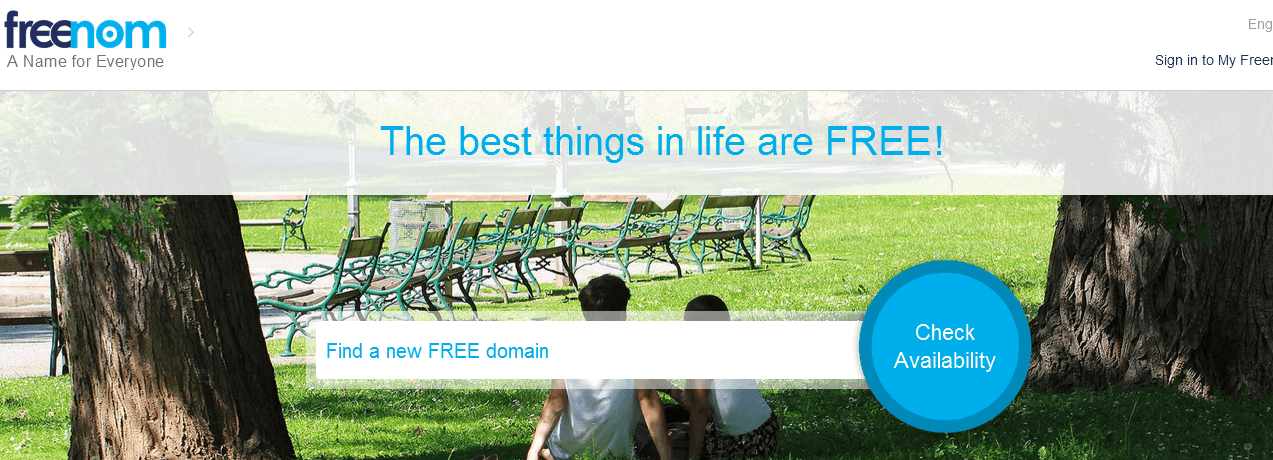
1.Signup at Freenom.com (See the Screenshot Below)
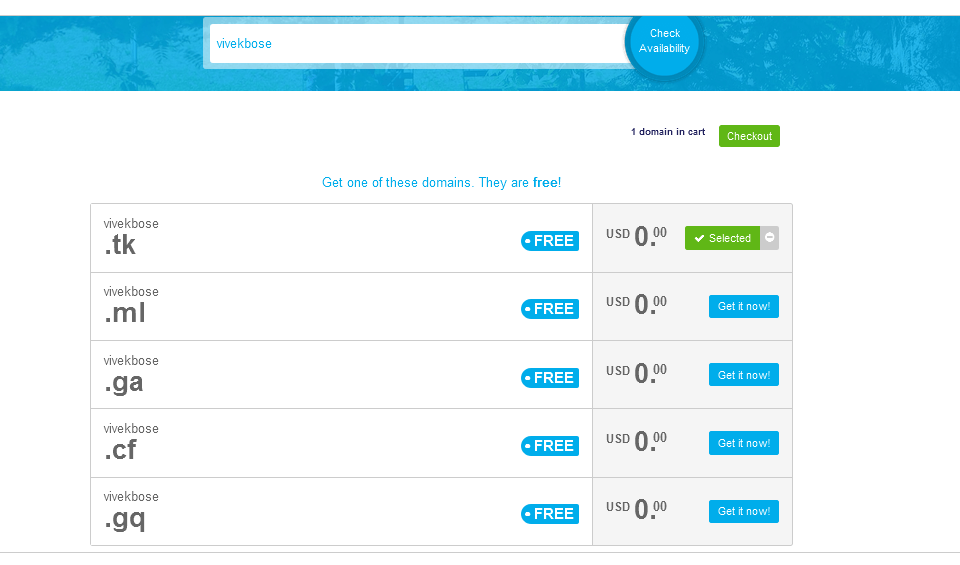
2.After Signin Enter Name of Your Domain Name (in My Case I entered VIVEKBOSE) to checkout available domain options( In This Case .tk,.ml,.ga,.cf,.gq were free).Select Any One And Register it for 12 Months Atleast.
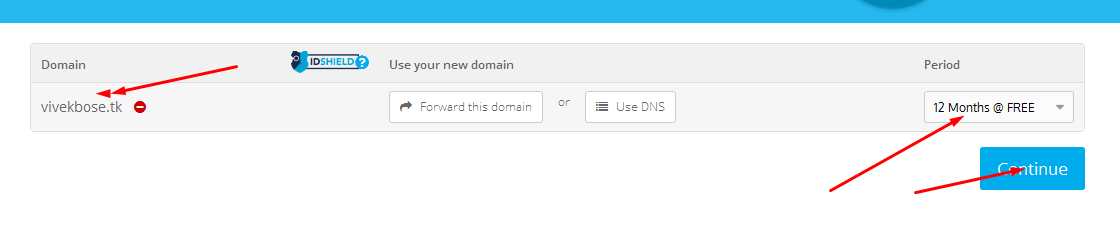
I am Registering it for 12 Months, Click Option Continue,Enter the Details & Click Checkout to Finalize the Domain Registration Process
OpenShift Cloud Hosting
OpenShift is Red Hat’s Platform-as-a-Service (PaaS) that allows developers to quickly develop, host, and scale applications in a cloud environment. With OpenShift you have a choice of offerings, including online, on-premise, and open source project options.
Benefits of OpenShift Cloud Hosting
- No MONEY NO CREDIT CARD REQUIREMENT YET Superior Performance
- Million Times Better than Free Webhosting Providers who are Notorious for SUSPENDING Websites once it starts receiving traffic
- Scalable Once You Start Getting Heavy Traffic(For Starters I will Definitely Suggest OpenShift Online)
Free plan offers Virtual Containers (Gears) with 512MB RAM & 1GB WebSpace sufficient for any Newbie Blogger.
How to Start WordPress Website at Openshift
1.Go to Openshift Online & Signup (Ignore if you have signed up,Choose Free Account During Signup).
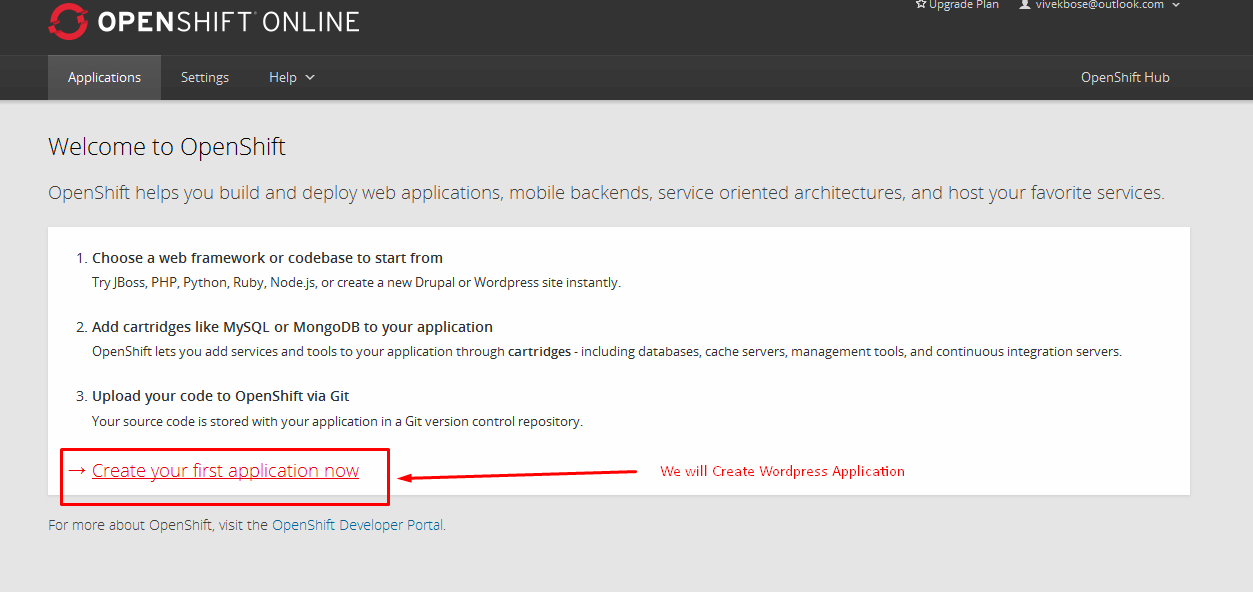
2.Signin into Account & Click Create Your First Application Now as in Screenshot
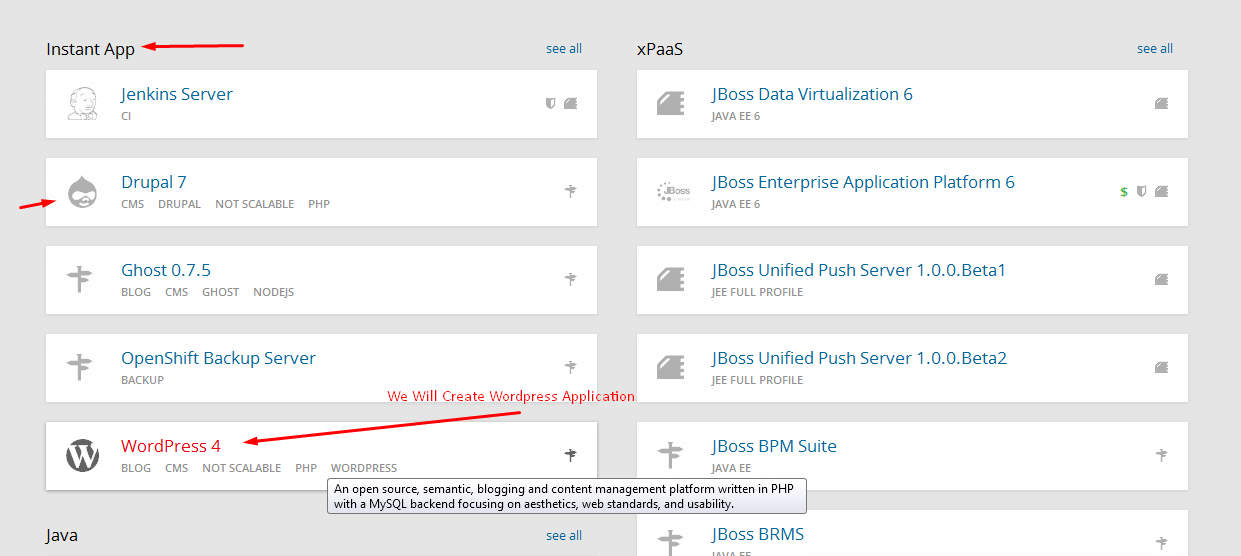
3.Under Instant App,Click WordPress 4.4 as in Screenshot
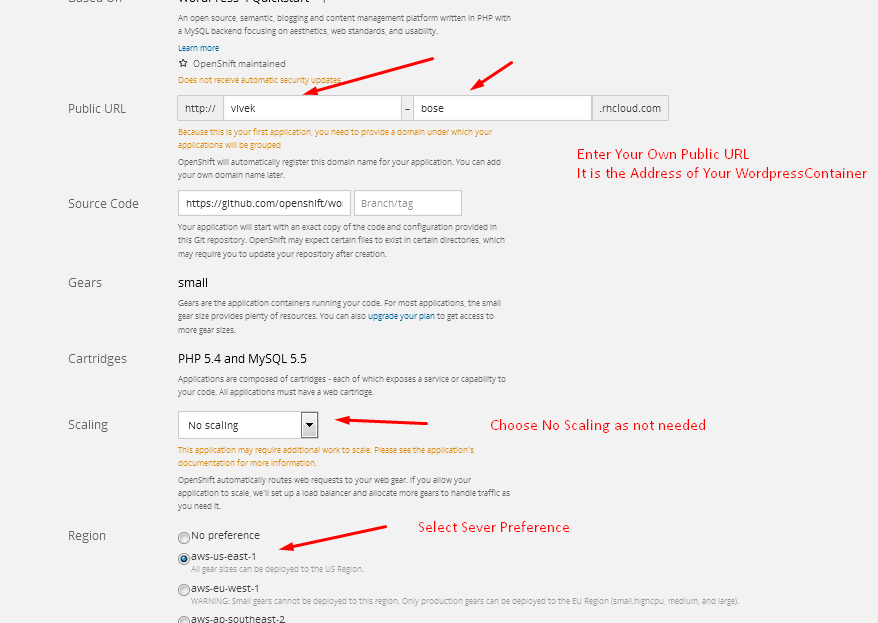
4.Under Configuring Applications, Enter Details like PUBLIC URL & Other Details,You can Enter anything it must be unique.Click Create Application it Will Take Time
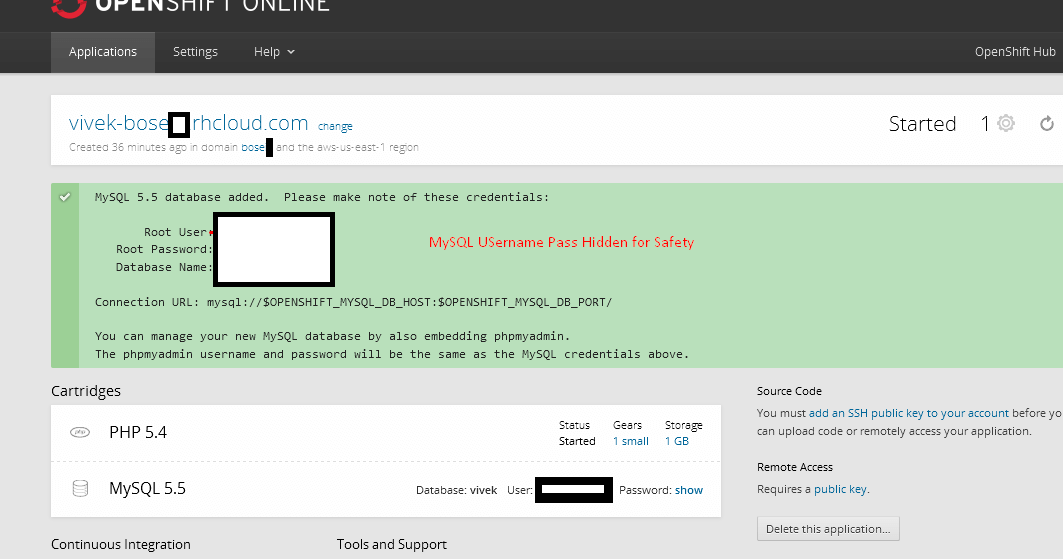
After Few Minutes,You Will get The Credentials Window as shown in Screenshot Below
5.Click on the Application URL to Get WordPress Installation Screen(in This Case vivek-bose.rhcloud.com)
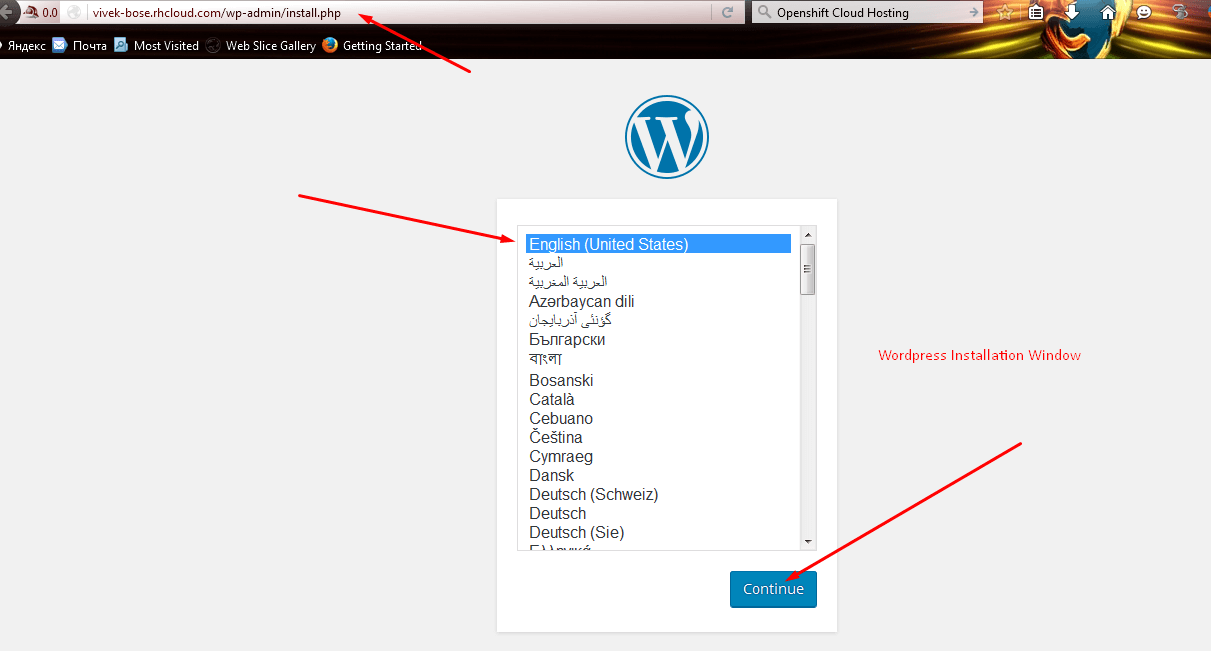
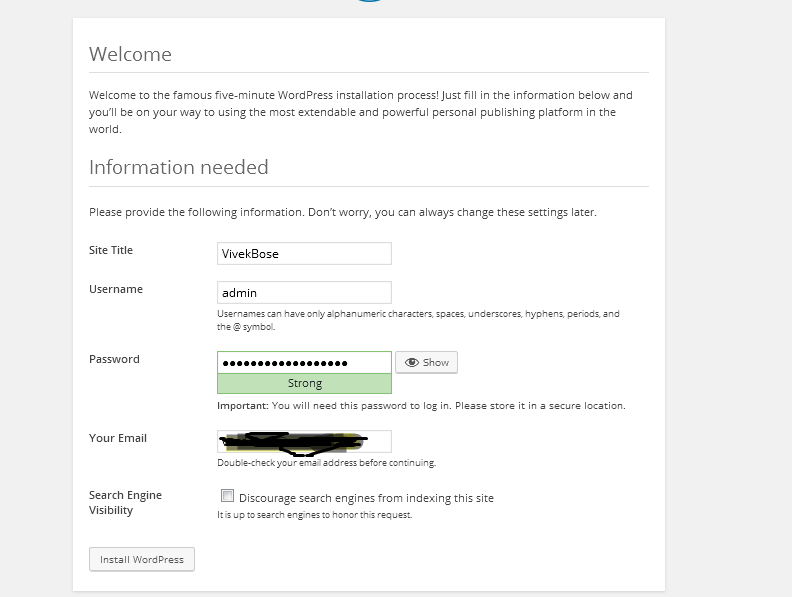
6.In Next Step Enter Your Website Title,Password,Username & Email ID & Click Install WordPress to Get Your New Website
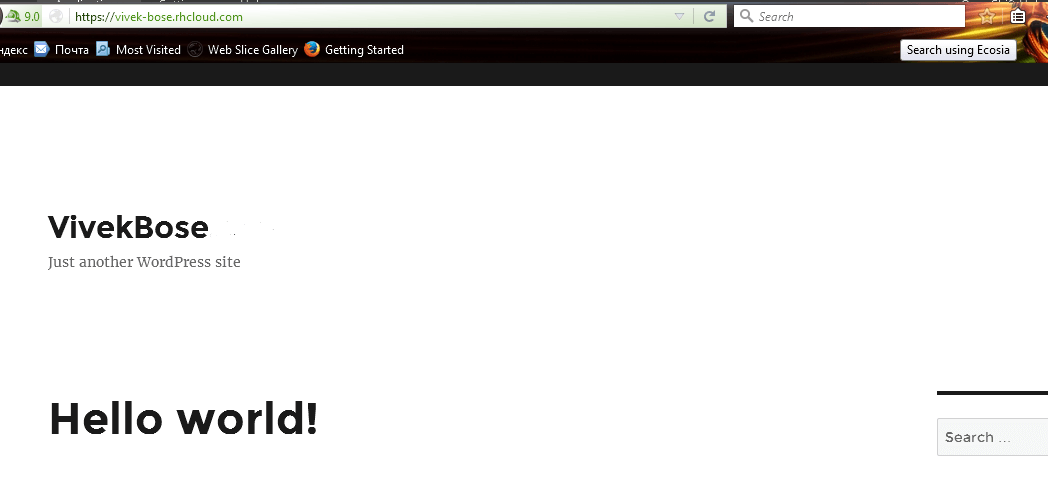
Finally Your WordPress Website is Ready( Check it out visit your own Application URL in this case vivek-bose.rhcloud.com).You can Access Admin Panel via (http://siteurl/wp-login.php)
We Have Finished Installing WordPress on Open Shift Online Server.Now We Need to Map our Own Domain Name to Our Application URL
How to Use Custom URL Names for WordPress Websites at Openshift
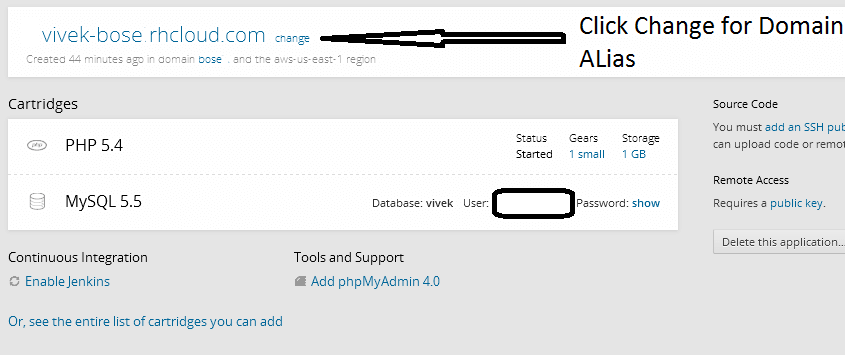
1.Under Openshift Applications,Click Change in Order to Insert Your Own Domain Name(We Will Use Free Domain Name .tk created in FREENOM.com).If you Have Purchased Your Own Domain Name,Put it There
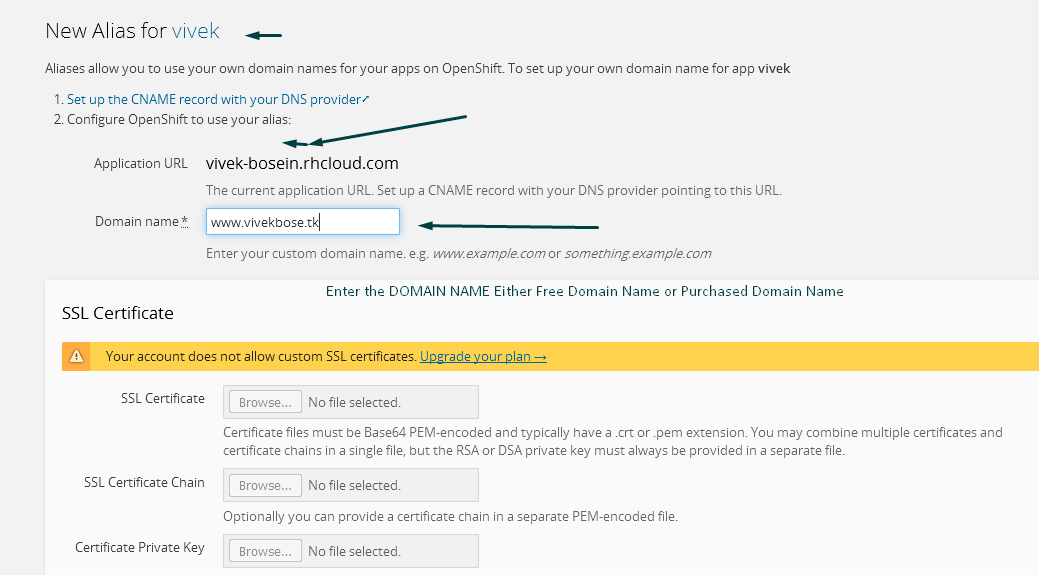
2. Enter Your Own Domain Name if you have it or Enter Free Domain Name Registered Earlier in Freenom.com(in This Case vivekbose.tk)
3.You Will See Successful Domain Aliasing Process in Next Screenshot
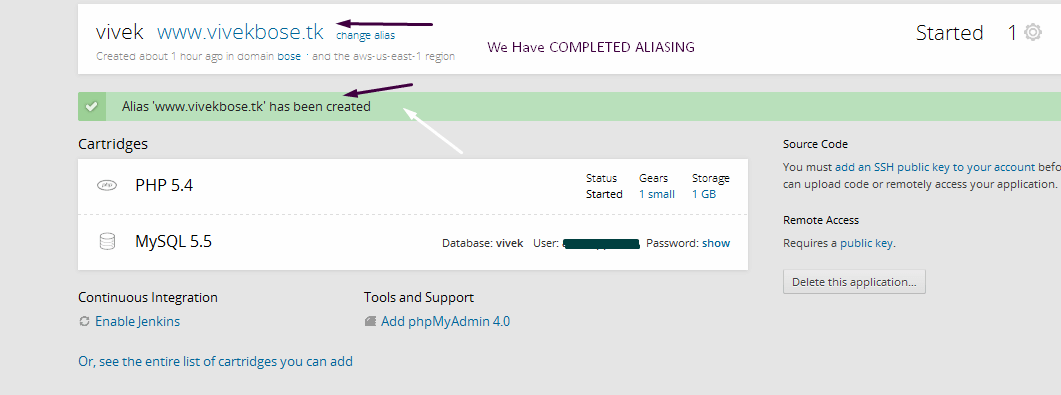
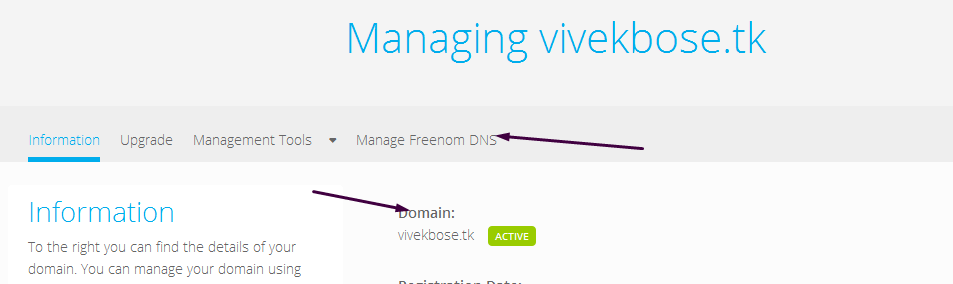
4.Now It is Time to Point OUR .TK Website to OpenShift Online.Login to Freenom.com and Go to Domain Area->Click Manage Freenom DNS[If you have Purchased Domain, Go to DNS Management of Your Domain Registrar]
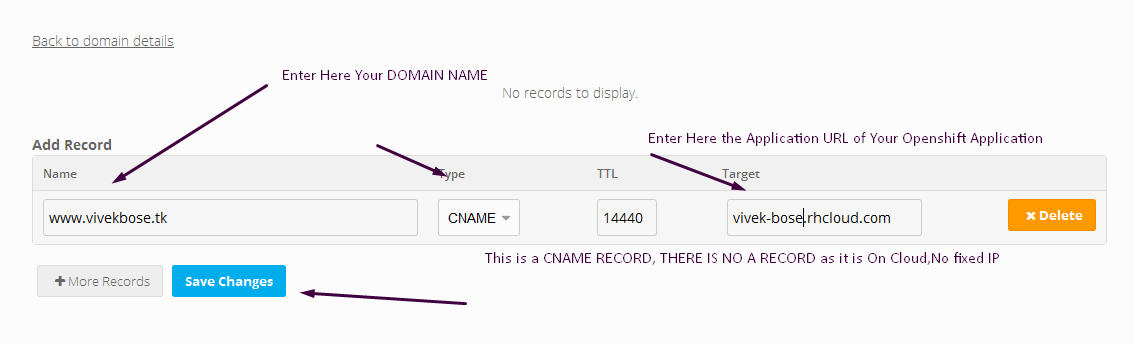
5.Enter the Details of your Application URL in TARGET Field,NAME to BE WWW and Type:CNAME,Then Save it
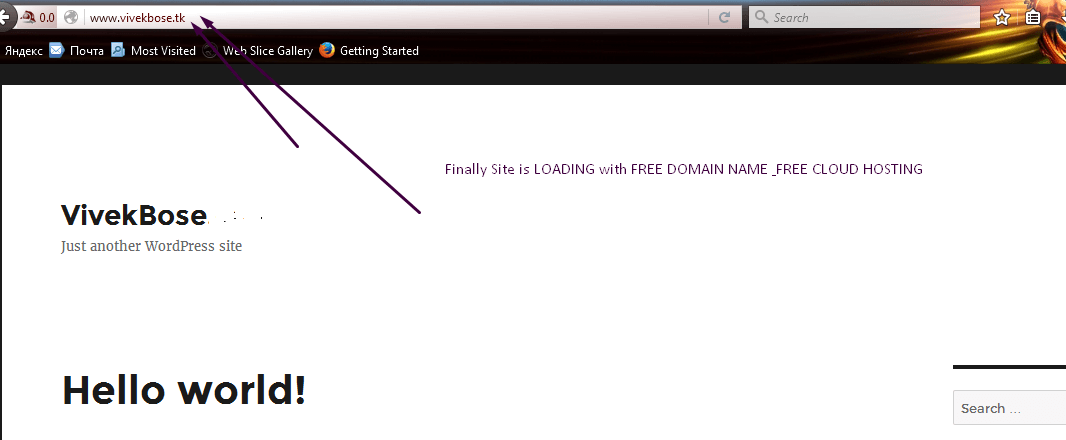
6.Wait for DNS Propagation for nearly 3-4 Hrs and Then Hit Your Domain in Browser with URL(https://www.vivekbose.tk or your own site http://www.mysite.com)
Now We Need to Change Site URLs from Inside WordPress Administration Panel,(visit http://www.yoursite.tk/wp-login.php or in this case http://www.vivekbose.tk/wp-login.php) & enter username password.Finally go to Settings & Update Your Site URL
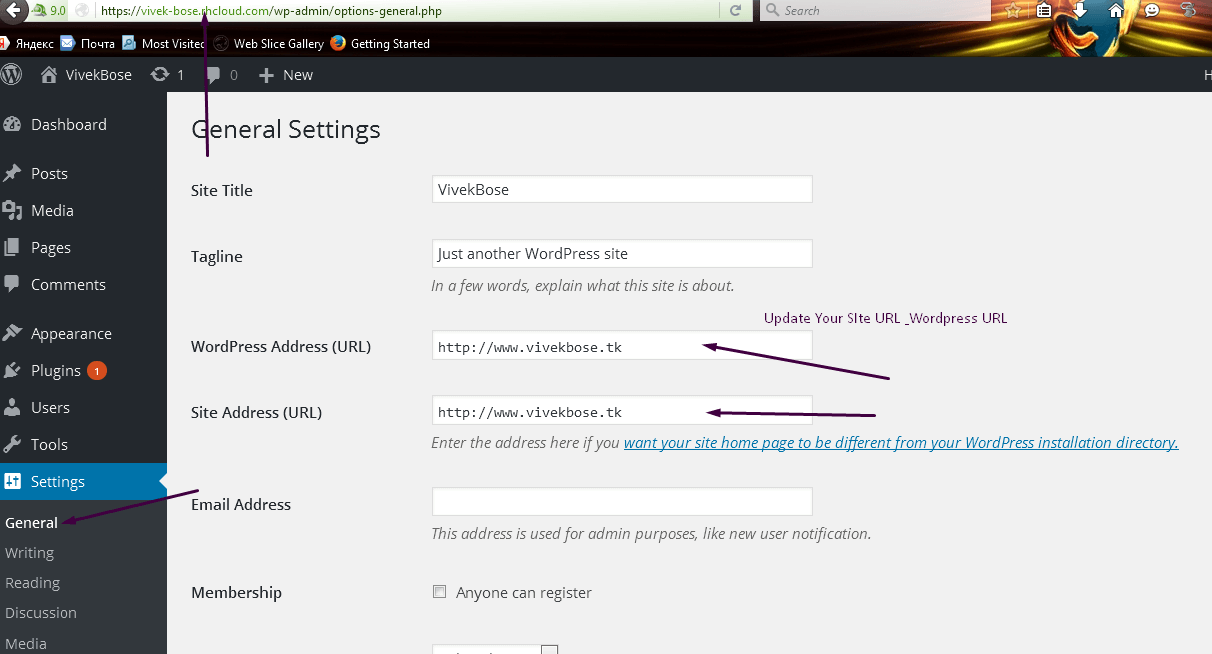
Finally Click Save Changes,Now You have Successfully Completed How to Start Your Own Website on Cloud Hosting For Free.You can Now Run Your WordPress Website on Openshift Online Cloud Hosting for Free Unless your Domain Expires.
Final Word on How to Start Your Own Website on Cloud Hosting For Free
I will Definitely Suggest You to Buy Top Level Domains If you Have Plans for Long Term Blogging as .tk & Free Domains have Low SEO Visibility.They are often rescinded to Other Users & can be Terminated without any reason.In School Days I often Used to use Free Domains With Free Webhosting which Used to Get Terminated after few months.But With Openshift Cloud Hosting by RED HAT,I have Finally Managed to Establish a Long Term Web Adventure with My own Domain Vivekbose.com wihout any Investments except Annual Domain Charges.
I would Explicitly Advice You to Avoid any Free Shared Webhosting Providers as these Shared Hosting Providers Suspend Your Account against Traffic Tradeoff.They allure Potential Customers for Heavy Billing in the Long Run.They Never Disclose about Throttling and Bandwidth Limitations. Free is a Simple Marketing Strategy to Convert a Potential Buyer into Long Term Customer.
However,I have Been Using Openshift Online Free Plan & Has Not Experienced any kind of trouble since migration from Free Shared Webhosting.